Tester Activity
Do Google Play Closed Testers Need to Use the App Daily?
Separate Google's continuous opt-in requirement from meaningful tester engagement, then plan a realistic 14-day activity and feedback schedule.
On this page · 9 sections
- 01Separate the published rule from good testing practice
- 02Why activity still matters
- 03Use a lightweight 14-day activity plan
- 04Give testers tasks that produce evidence
- 05Avoid fake engagement signals
- 06What to do if a tester misses a day
- 07Prepare a truthful closeout summary
- 08Frequently asked questions
- 09Official sources
At a glance
In plain English
- Google's published minimum says 12 testers must remain opted in continuously for 14 days; it does not state a once-per-day launch quota.
- A qualifying clock is not a quality test plan. Google asks about your testing process, feedback, and production readiness.
- Give testers a few meaningful scenarios across the window instead of asking for empty daily opens.
- Keep honest records of findings, fixes, and retests so your production-access answers describe real work.
Separate the published rule from good testing practice
For personal developer accounts created after November 13, 2023, Google's current Help Center says a closed test needs at least 12 testers opted in continuously for the preceding 14 days before the developer applies for production access. It also says a tester who opts out and later opts back in needs a new consecutive period to count.
That documentation does not define a daily app-open quota. Avoid telling testers that a midnight-to-midnight launch is an official rule unless Play Console gives your account a more specific instruction. At the same time, remaining opted in without testing meaningful flows gives you little evidence that the app is ready.
Why activity still matters
The production-access application asks about your closed test, your app or game, and production readiness. Google's guidance tells developers to give testers clear instructions, encourage them to use as many features as possible, provide a feedback channel, and keep testing while resolving reported problems.
That makes activity useful for two reasons: it can reveal failures before launch, and it gives you specific facts for the application. A statement such as ‘testers tried sign-up, offline recovery, and checkout; we fixed two navigation problems and retested them’ is stronger and more honest than a list of daily opens with no observations.
Use a lightweight 14-day activity plan
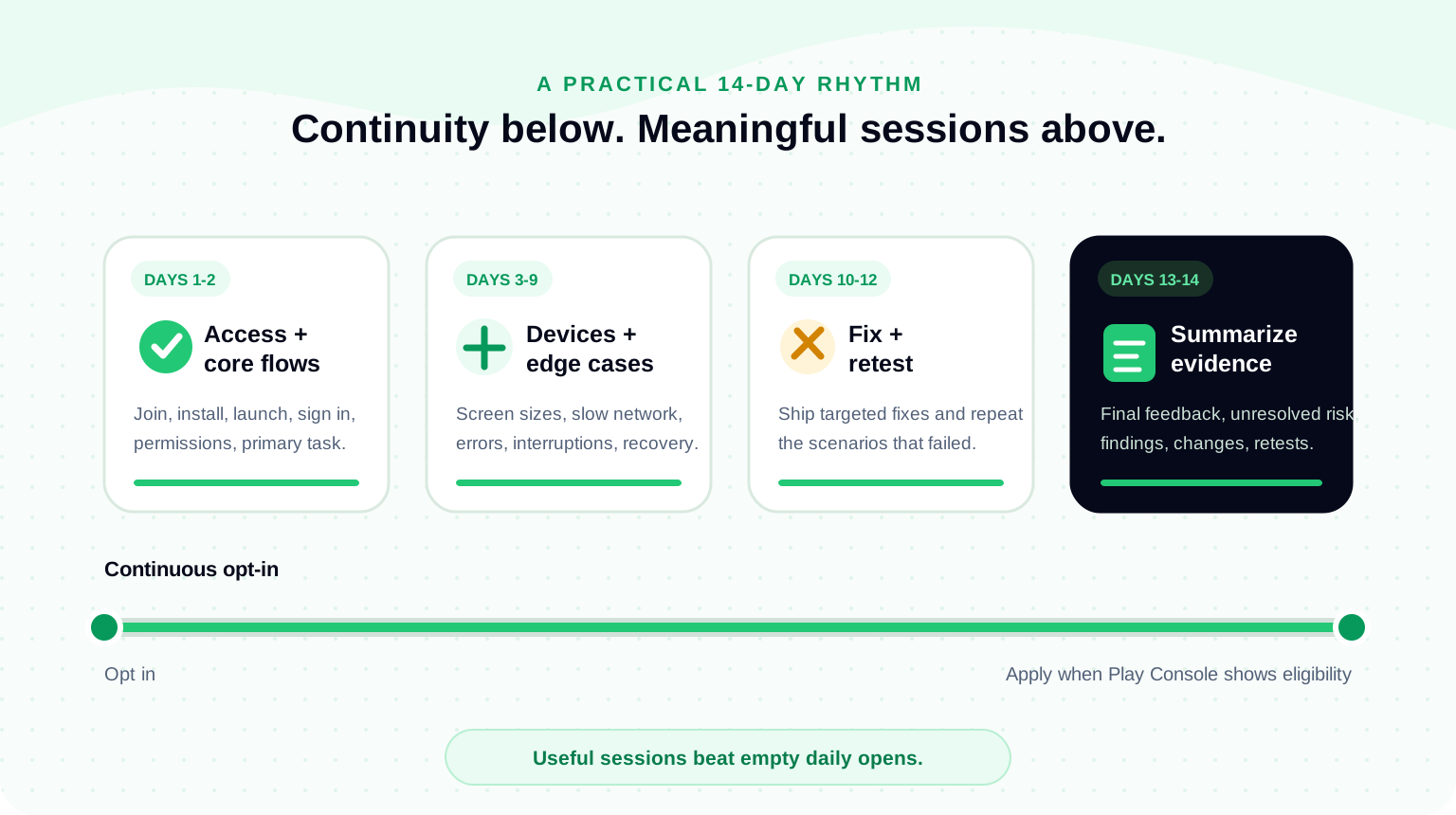
A small app does not need fourteen identical assignments. Ask every tester to complete the critical first-run path, then distribute secondary scenarios according to devices and user roles. Leave time to ship a fix and have the affected people retest it.
The schedule below is an editorial planning example, not a Google-prescribed calendar. Adapt it to your app's risks and do not claim a scenario was completed unless you received a result.
- Days 1-2: verify opt-in, install, launch, sign-in, permissions, and the primary task.
- Days 3-6: cover important secondary flows on different Android versions and screen sizes.
- Days 7-9: test weak networks, interruptions, validation errors, empty states, and recovery.
- Days 10-12: distribute fixes and retest the specific scenarios that failed.
- Days 13-14: confirm the release candidate, collect final feedback, and summarize unresolved risk.
Give testers tasks that produce evidence
Write tasks around an outcome, not a tap sequence. ‘Create an account and tell us where you hesitated’ can reveal comprehension problems. ‘Tap button A, then button B’ may only prove the script was followed. Include the expected result, but leave room for the tester to describe what actually happened.
For each issue, record the build, device, Android version, scenario, observed result, expected result, severity, and any screenshot or screen recording. When you ship a fix, connect the retest to the original issue. Keep personal data out of screenshots and notes unless it is necessary and handled under your privacy process.
- Can a new user understand the first screen without coaching?
- Does the main task finish successfully on slow or interrupted connectivity?
- Are errors explained in language the user can act on?
- Do permissions, notifications, links, and back navigation behave as expected?
- Can the tester recover after closing, updating, or returning to the app?
Avoid fake engagement signals
Do not ask people to open the app and immediately close it solely to create activity. Do not automate sessions or manufacture feedback. Those actions do not improve the app and can leave you unable to explain what the test actually changed.
Also keep public reviews separate from closed testing. Google states that testers cannot leave public reviews for test versions. Use the private testing feedback channel, an email address, or your own issue form to gather observations during the run.
What to do if a tester misses a day
A missed app session is not the same as opting out. Based on Google's published wording, the explicit continuity condition concerns remaining opted in. Check the tester's current participation and the Play Console eligibility state instead of announcing a reset based only on a day without use.
If the tester opted out, was removed from the eligible list or Group, or otherwise lost participation, treat their continuity as at risk. Replace guesswork with the current Play Console state, keep enough buffer testers, and delay the application if the required continuous cohort is not present.
Prepare a truthful closeout summary
At the end of the window, summarize who the intended users were, which scenarios were covered, the device mix, feedback themes, changes made, retest results, and known limitations. This is useful even if your application form asks the questions in a different order.
Do not copy another developer's production-access answer. Your strongest answer is a concise account of your own test. If the records are too thin to describe meaningful work, extend the test and gather the missing evidence before applying.
Check production-access readinessReview tester continuity, feedback, fixes, policy checks, and application evidence before you submit.FAQ
Questions about this topic
Must every closed tester open the app every day for 14 days?
Google's published minimum requires at least 12 testers to remain opted in continuously for the preceding 14 days. Its Help Center does not publish a rule requiring every tester to open the app once per day. Meaningful testing and feedback are still important for app quality and production-access answers.
Does the 14-day period reset if a tester misses one day of app use?
The published continuity rule is about opt-in status. A day without an app session is not described as an automatic reset. If a tester opts out and later rejoins, Google says the days must again be consecutive for that tester to count.
How often should testers use the app?
Schedule enough purposeful sessions to cover the app's critical flows, edge cases, fixes, and retests. The right frequency depends on the app; useful observations matter more than repetitive opens.
Can closed testers leave Play Store reviews?
No. Google says testers cannot leave public reviews for test versions. Collect private feedback through Google Play or a direct channel such as email or a feedback form.
Sources
Official references used
- App testing requirements for new personal developer accounts (Google Play Console Help)
- Set up an open, closed, or internal test (Google Play Console Help)
Continue
Choose the next step
Related
Next pages to read
Need 12 testers for 14 days?
Start a managed Google Play closed-testing run with verified testers, opt-in monitoring, and a closeout report.